Deploy an application (deploy agents)
Install the Cushy deploy agent as a native package on Linux or a real Windows service, connect your application repository, and run a real clone → build → deploy → health-check pipeline with live logs, diagnostics and one-click rollback.
A deploy agent is a background service you run on a machine you control — Linux or Windows. It dials out to Cushy (no inbound ports, no firewall holes), picks up deploy jobs for your organization only, and does the real work: clone the repository, build the container image, run it, publish a port and health-check it. Everything it does is streamed back to the console: the exact command, the exit code, the duration and the full stdout/stderr of every stage.
The agent is a single static binary written in Go — no runtime to install, no dependencies to resolve — and it installs the way anything else on your server does: a .rpm or .deb package on Linux, a registered Service Control Manager service on Windows. It manages its own service lifecycle (install, uninstall, status), so there is no wrapper script to babysit.
What you need
- A machine (Linux or Windows) with git and Docker. Nothing else — the agent brings its own runtime.
- An application Git connection in Cushy (see Git connections).
- The manage cloud accounts capability to enroll an agent; deploy rights (
mutate_infra) to run or roll back a deploy.
1. Connect the application repository
On the Git screen, connect the repository that holds your application code and set its type to Application. An application connection is a pipeline *source*: unlike an infra connection it is never used as a Terraform GitOps target, so nothing is ever committed to it.
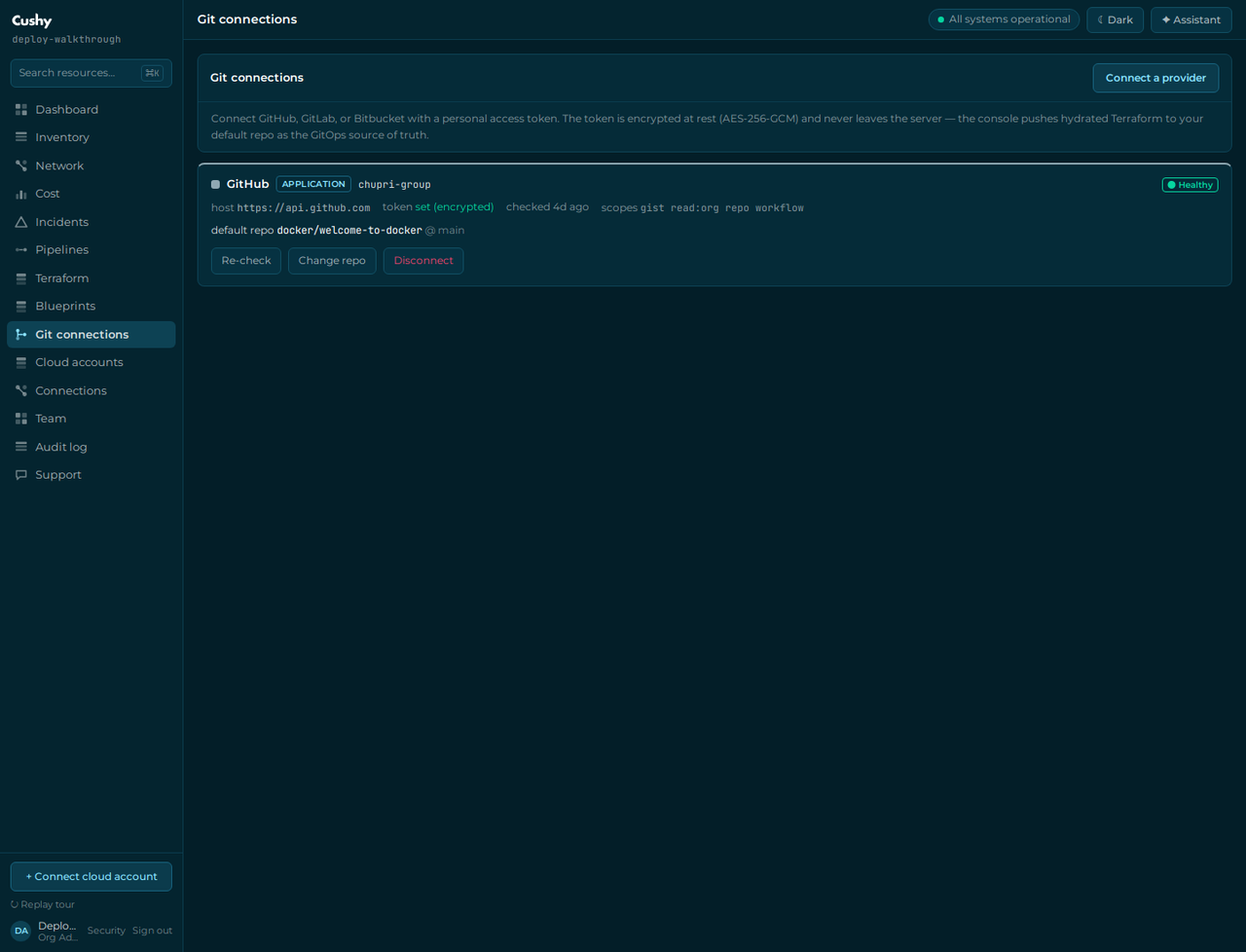
tokenSet, never the token.2. Enroll the agent
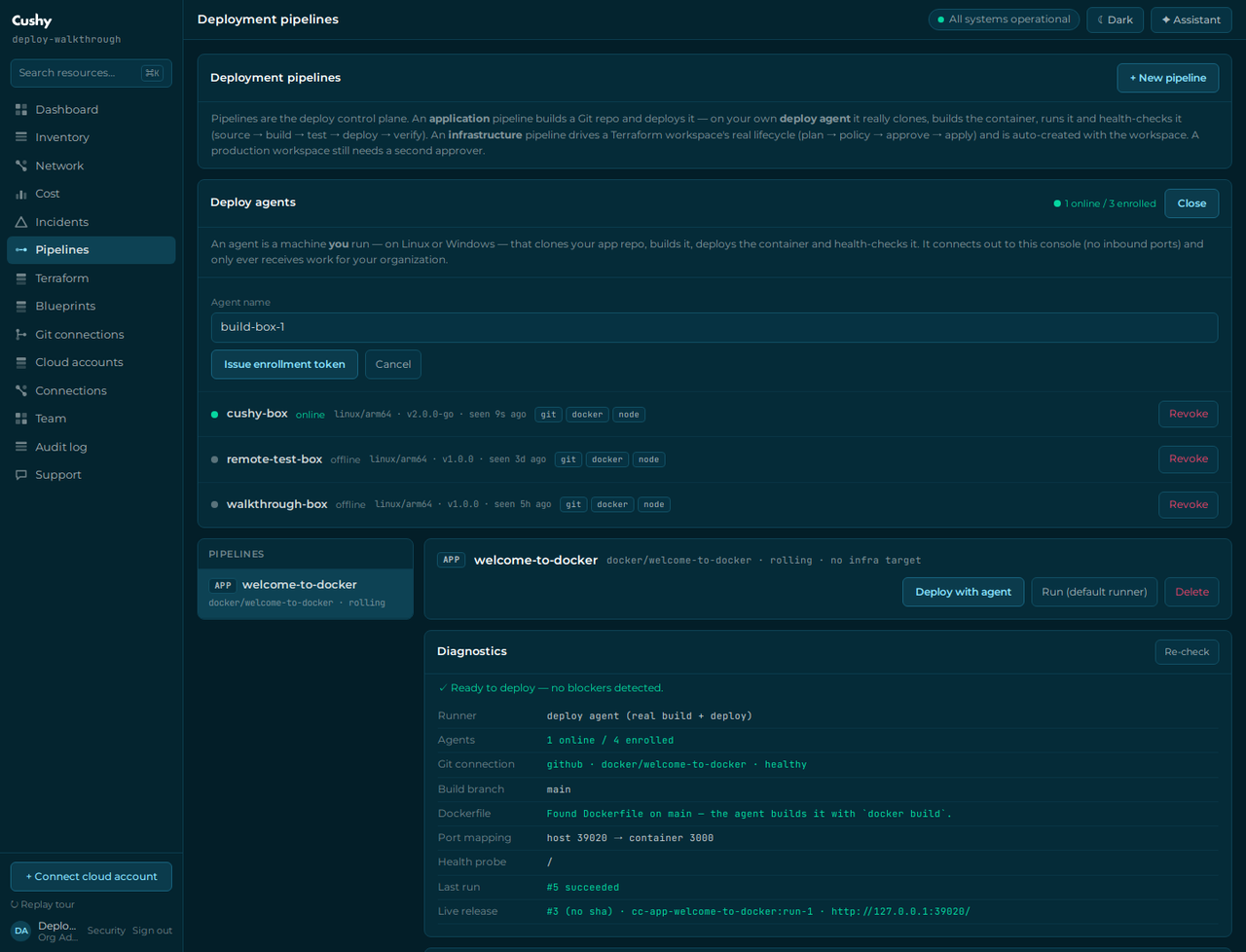
On Pipelines → Deploy agents → Enroll agent, give the machine a name. Cushy issues a one-time enrollment token (cc_agt_…) and shows the exact install commands for Linux, Windows and containers.
3. Install it as a service
Linux — one command
This installs the native package for your distribution (.rpm where dnf/yum is present, .deb where apt is), verifies its SHA-256 before installing it, writes the credential file and starts the systemd service:
export CC_URL="https://cushy.snoweasl.com"
export CC_AGENT_TOKEN="cc_agt_…"
curl -fsSL https://cushy.snoweasl.com/api/agent/install.sh | sudo -E sh

# container builds need Docker access for the service account
# (this is root-equivalent on the host — do it deliberately)
sudo usermod -aG docker cushy-agent && sudo systemctl restart cushy-agent
Linux — install the package yourself
If you would rather see the package before it lands, download it and install it with your package manager. Both architectures (x86_64/amd64 and aarch64/arm64) are published, and every artifact has a sha256 sidecar.
# RPM (Amazon Linux, RHEL, Fedora, openSUSE)
curl -fsSLO "https://cushy.snoweasl.com/api/agent/download/linux/$(uname -m)?format=rpm"
sudo dnf install ./cushy-agent-*.rpm

# DEB (Debian, Ubuntu)
curl -fsSLO "https://cushy.snoweasl.com/api/agent/download/linux/$(uname -m)?format=deb"
sudo apt install ./cushy-agent_*.deb

# then enroll and start it (the token is read from the environment, never a flag)
sudo CC_URL="https://cushy.snoweasl.com" \
     CC_AGENT_TOKEN="cc_agt_…" \
     cushy-agent install
The package installs /usr/bin/cushy-agent, ships the systemd unit at /usr/lib/systemd/system/cushy-agent.service, creates a dedicated cushy-agent system account, and marks /etc/cushy-agent/agent.env (mode 0600) as a configuration file — so an upgrade never clobbers your enrollment. It enables the unit but does not start it until a token is configured, and prints the one command that finishes enrollment.
Windows
From an elevated PowerShell. This downloads the versioned bundle (cushy-agent.exe + install.ps1 + README), verifies its SHA-256 and registers a real Service Control Manager service with automatic start and restart-on-failure recovery:
$env:CC_URL="https://cushy.snoweasl.com"
$env:CC_AGENT_TOKEN="cc_agt_…"
irm https://cushy.snoweasl.com/api/agent/install.ps1 | iex

cushy-agent status
sc.exe query cushy-agent
Prefer to inspect the bundle first? Download …/api/agent/download/windows/amd64?format=zip, check the hash, extract it, and run .\install.ps1 from an elevated prompt in that folder. Install Git for Windows and Docker Desktop first.
Container
docker run -d --name cushy-agent --restart unless-stopped \
  -v /var/run/docker.sock:/var/run/docker.sock \
  --add-host host.docker.internal:host-gateway \
  -e CC_URL="https://cushy.snoweasl.com" \
  -e CC_AGENT_TOKEN="cc_agt_…" \
  -e CC_AGENT_VERIFY_HOST=host.docker.internal \
  cushy-agent:latest
The image is alpine plus git and docker-cli — not scratch or distroless, because the agent's whole job is to shell out to those two tools. It builds and runs containers on the host daemon, so it needs /var/run/docker.sock; that is root-equivalent access to the host, and it is inherent to the job rather than a shortcut.
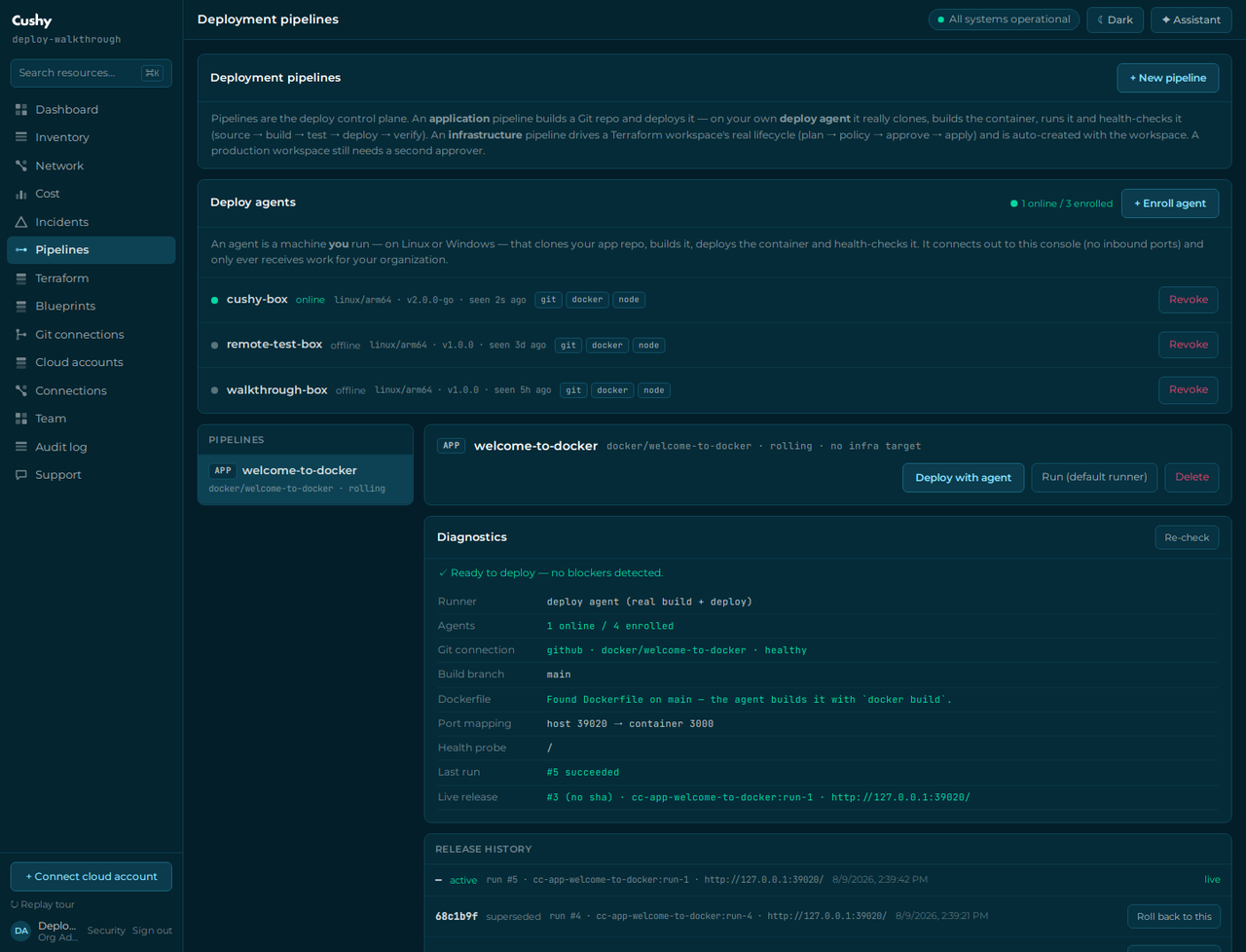
The agent heartbeats every 20 seconds with its version, OS, architecture and detected capabilities (git / docker / node / kubectl). The Deploy agents card shows each agent as online or offline with its last-seen time.
4. Create the pipeline
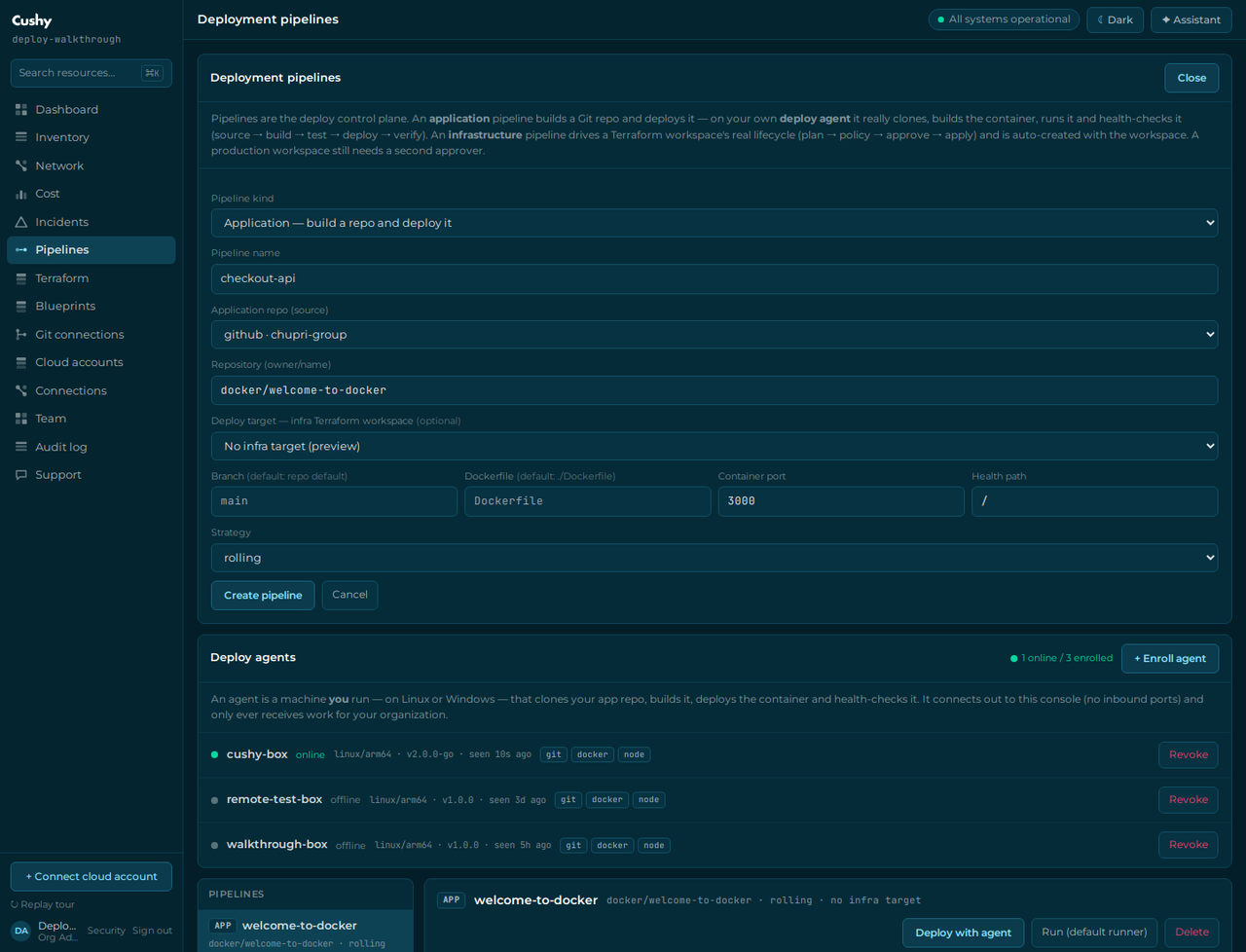
On Pipelines → + New pipeline, pick Application, choose your application Git connection and repository, then set the deploy config: branch (default: the repo's default branch), Dockerfile path (default ./Dockerfile), the container port your app listens on, and the health path the verify stage probes. Cushy allocates a stable host port per pipeline (39000–39499) unless you pin one. You can change any of this later with PATCH /api/pipelines/{id}.
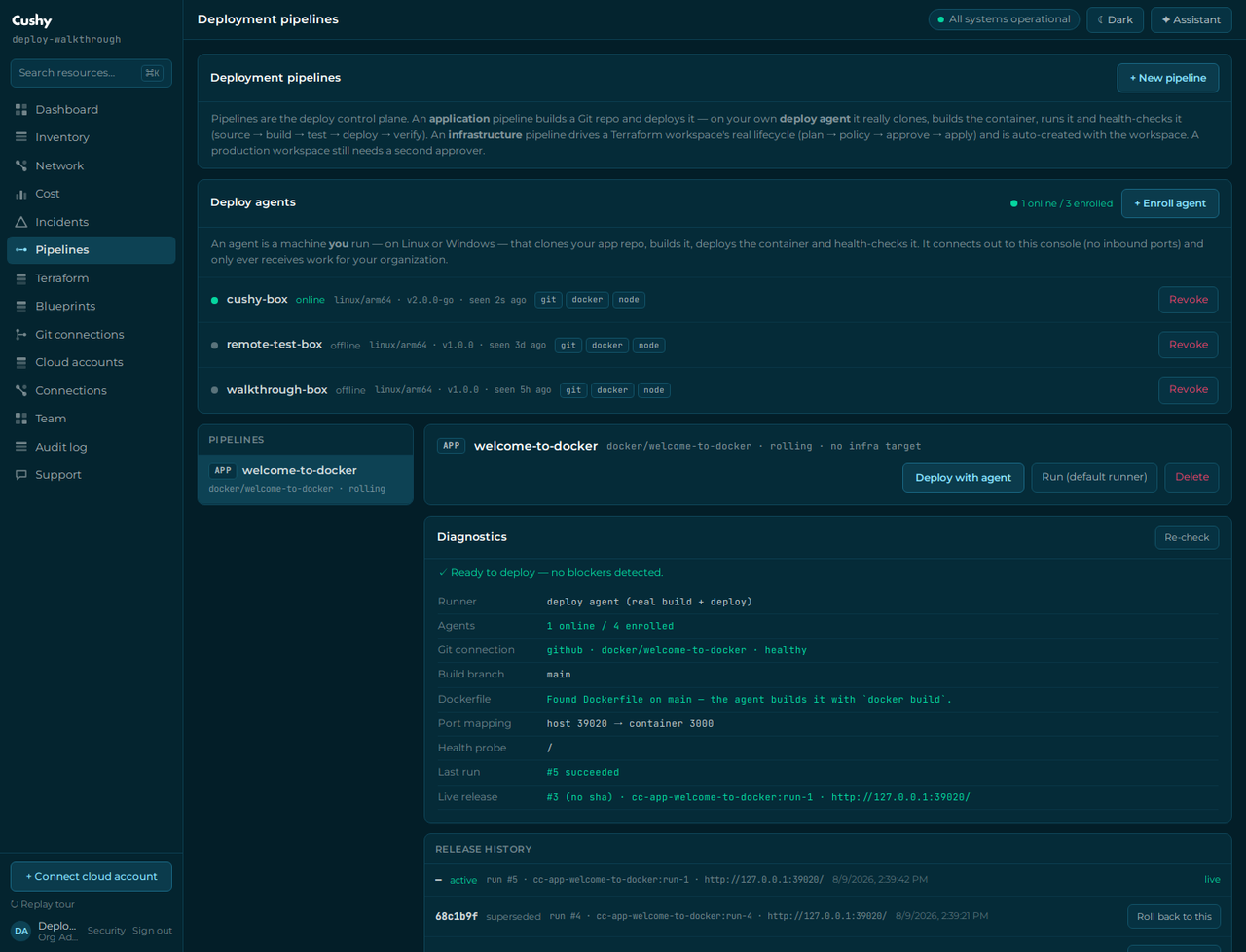
5. Check the diagnostics before you deploy
The Diagnostics panel answers the questions a failed deploy would otherwise make you guess at — and it answers them from real probes, not from configuration echoes.
6. Deploy
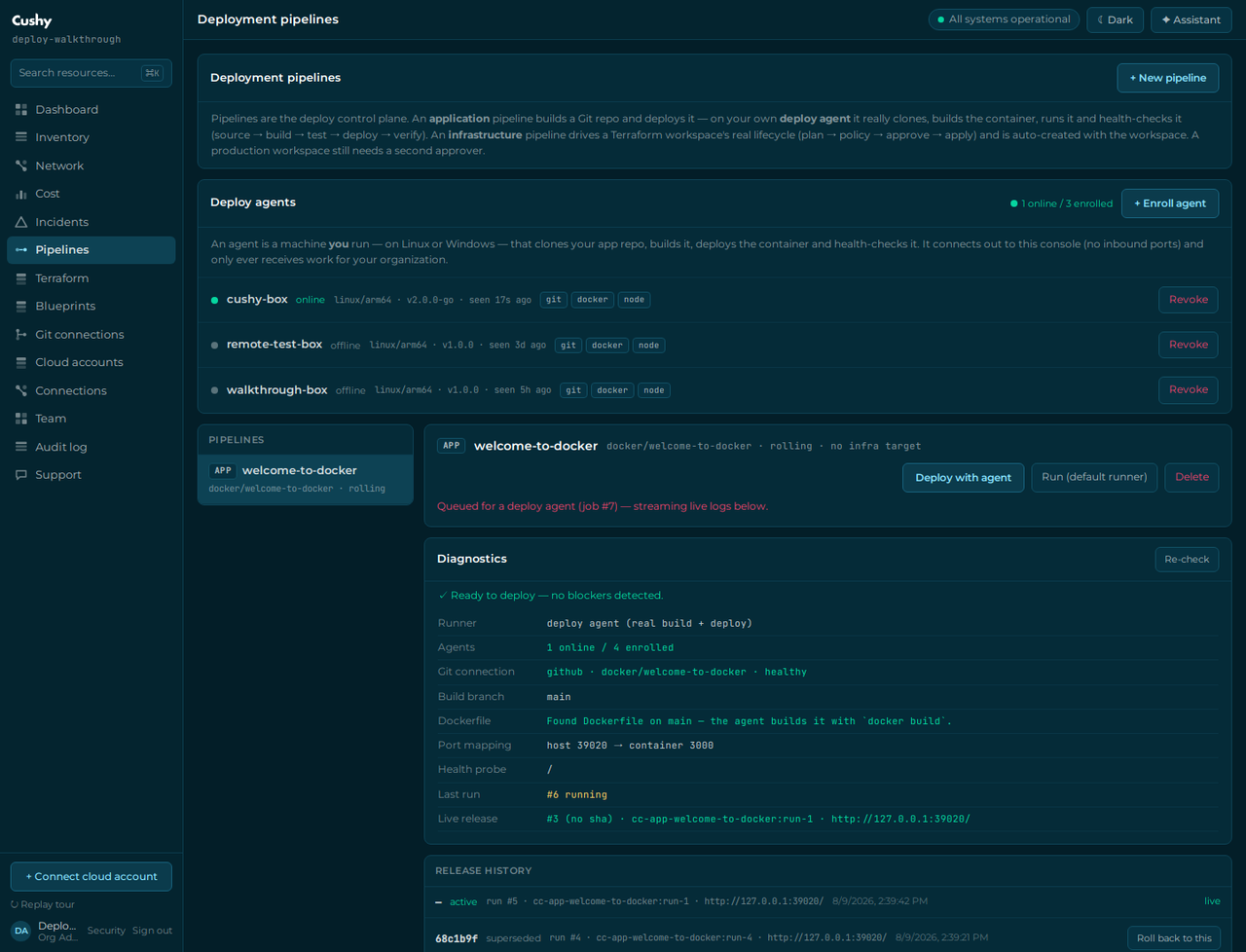
Press Deploy with agent. The run is queued for your agents and the full stage timeline appears immediately, so you can see what the run *will* attempt before anything has run.
- source —
git clone --depth 1 --branch <ref>, then the resolved commit sha. Your repository token is used throughGIT_ASKPASS, so it never appears in a command line, a URL or a log. - build —
docker buildwith your Dockerfile. No Dockerfile? The agent generates a documented Node buildpack (node:22-alpine,npm ci→npm run build --if-present→npm start) and builds that. No Dockerfile *and* nopackage.jsonis an honest failure, not a guess. - test (optional) — your test command run inside the freshly built image.
- deploy — the old container is removed and the new image is run with your port mapping and environment.
- verify — an HTTP probe of the published port until it answers 2xx/3xx. If it never does, the agent captures the container's own last 60 log lines into the stage — usually the answer is right there.
When it fails
The interesting half. Below, the deploy config declares container port 9999 while the application actually listens on 3000 — a mistake nobody notices until the health check never answers.
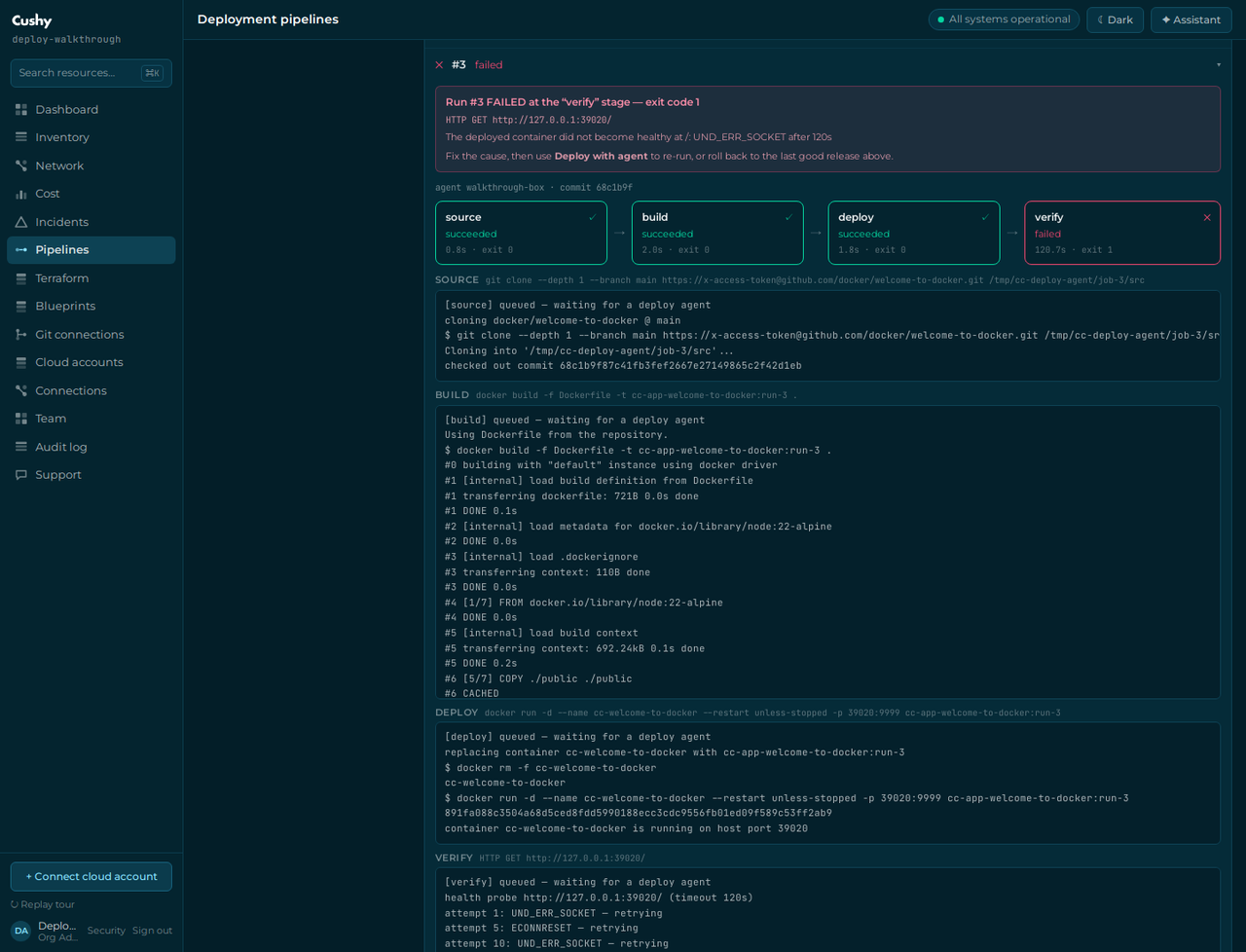
deploy succeeded; verify is what failed, and the run is failed. Cushy does not round a half-working deploy up to a success — if the agent did not observe the app become healthy, it says so.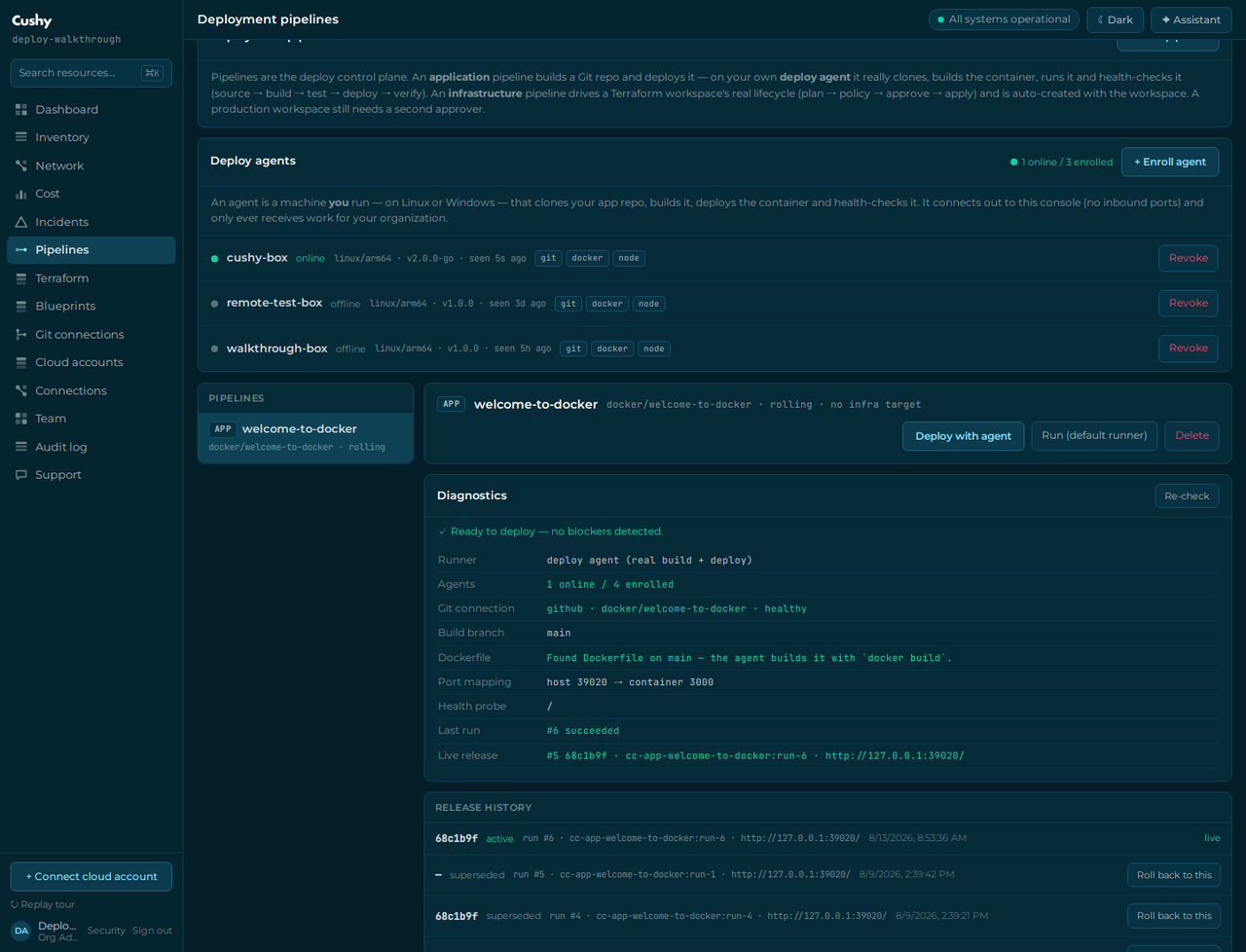
Fix the container port in the deploy config and press Deploy with agent again. Nothing else to clean up: the deploy stage removes the previous container before starting the new one.
Releases and rollback
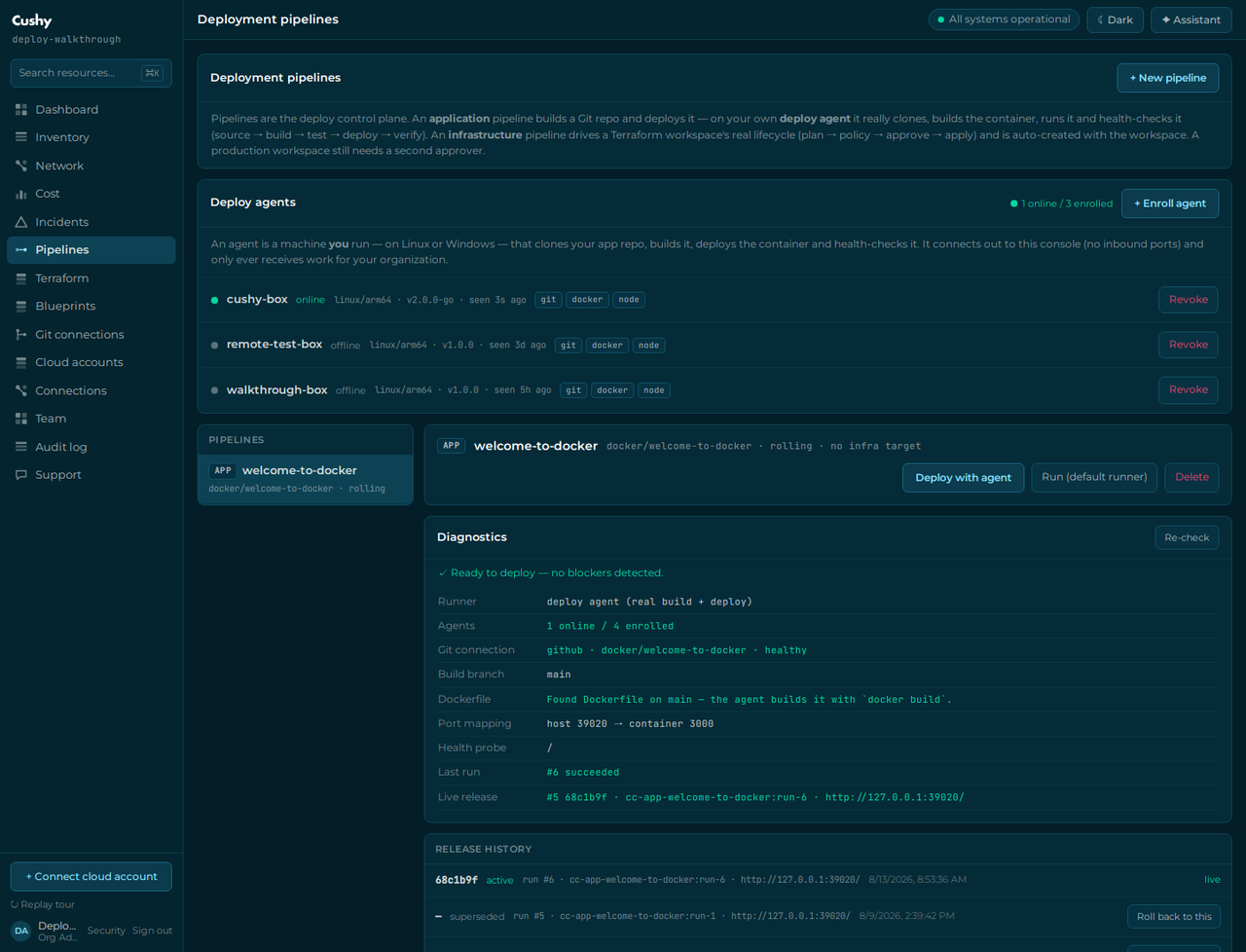
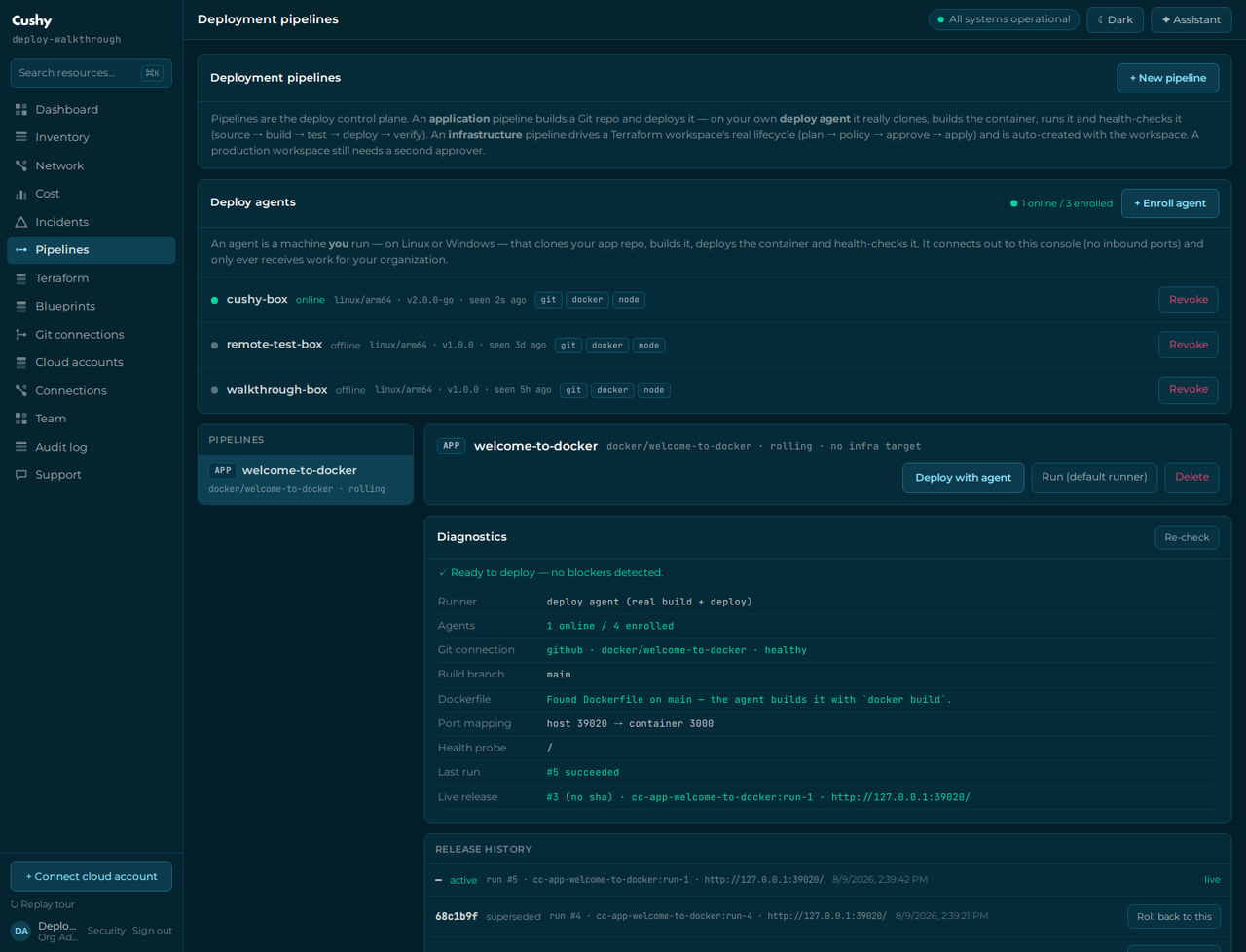
Every successful deploy is recorded as a release: commit sha, image reference, URL, host port and when. Roll back re-runs that exact image — no clone, no rebuild — which is why a rollback is a two-stage run (deploy → verify) and takes seconds.
Run it as a service
Both installers register a real service, so the agent survives reboots, crashes and the machine being busy. It is not a nohup in a screen session.
Linux (systemd)
cushy-agent status            # installed / active / enabled / last error
cushy-agent --check           # preflight: git, docker, kubectl, workdir

systemctl status cushy-agent
systemctl restart cushy-agent
journalctl -u cushy-agent -f # logs go to journald, not a file you must rotate- The unit sets
Restart=alwayswith a 5-second backoff — kill the process and systemd brings it straight back. - Configuration and the enrollment token live in
/etc/cushy-agent/agent.env, mode 0600, referenced byEnvironmentFile=. The token is never inlined in the unit, so it does not appear insystemctl cator in/proc/<pid>/cmdline. - Prefer a per-user service?
cushy-agent install --userwrites to~/.config/systemd/user/. A user service stops at logout unless you enable lingering (sudo loginctl enable-linger $USER), and it can only drive Docker if your account already can. - Docker socket access is root-equivalent on the host. Whether it is the
cushy-agentservice account or your own user, adding it to thedockergroup is a real privilege decision — the installer prints the command rather than doing it silently.
Windows (Service Control Manager)
cushy-agent status
sc.exe query cushy-agent
Get-Content C:\ProgramData\Cushy\logs\agent.log -Tail 40 -Wait

cushy-agent uninstall # stop, delete the service, delete the token- The service starts automatically at boot, before any user logs in, and has failure-recovery actions (restart after 5 s, 10 s, then 30 s) — the Windows equivalent of
Restart=always. - The token is stored at
C:\ProgramData\Cushy\cushy-agent.conf, DPAPI-protected with machine scope (a copy taken to another machine cannot be decrypted) and with a protected ACL granting access toSYSTEMandAdministratorsonly. The registeredImagePathcarries only the service name — never a credential. - A service has no console, so the agent writes its log to
C:\ProgramData\Cushy\logs\agent.log, rotated at 8 MB.
Upgrading from snowtrol-agent 1.x — a REINSTALL, not an upgrade
The product was renamed Snowtrol → Cushy, and the agent was renamed with it. The package name, the binary, the systemd unit, the service account, the state directory and the configuration path ALL changed, so your package manager sees an unrelated package — dnf install / apt install will happily leave the old snowtrol-agent running beside it, and both would try to claim the same jobs. Remove the old one first. There is no in-place path and we are not going to pretend otherwise.
| 1.x (Snowtrol) | 2.x (Cushy) |
|---|---|
snowtrol-agent (package, binary, service) | cushy-agent |
/usr/bin/snowtrol-agent | /usr/bin/cushy-agent |
/usr/lib/systemd/system/snowtrol-agent.service | /usr/lib/systemd/system/cushy-agent.service |
/etc/snowtrol-agent/agent.env | /etc/cushy-agent/agent.env |
/var/lib/snowtrol-agent | /var/lib/cushy-agent |
C:\ProgramData\Snowtrol\snowtrol-agent.conf | C:\ProgramData\Cushy\cushy-agent.conf |
The wire protocol is unchanged — same endpoints, same cc_agt_ token format, same CC_URL / CC_AGENT_TOKEN environment variables. So a token you already hold still works: you are moving the same enrollment onto the renamed service, not re-enrolling from scratch. Have the token to hand before you start, though: removing the old package deletes /etc/snowtrol-agent/agent.env, so read it out first if it is the only copy.
Linux — remove, install, re-enter the token:
# 1. read your existing enrollment out BEFORE removing anything
sudo cat /etc/snowtrol-agent/agent.env      # note CC_URL and CC_AGENT_TOKEN

# 2. remove the old agent (this deletes the old token file)
sudo snowtrol-agent uninstall
sudo dnf remove -y snowtrol-agent           # or: sudo apt remove -y snowtrol-agent
sudo userdel snowtrol-agent                 # optional: the old service account

# 3. install the renamed agent and re-enter the token
export CC_URL="https://cushy.snoweasl.com"
export CC_AGENT_TOKEN="cc_agt_…"
curl -fsSL https://cushy.snoweasl.com/api/agent/install.sh | sudo -E sh

# 4. Docker access is a fresh decision for the NEW service account
sudo usermod -aG docker cushy-agent && sudo systemctl restart cushy-agent

# 5. confirm
cushy-agent status                          # expect: active, version 2.0.0-go
Windows — from an elevated PowerShell:
snowtrol-agent uninstall                  # stop + delete the old service + token

$env:CC_URL="https://cushy.snoweasl.com"
$env:CC_AGENT_TOKEN="cc_agt_…"
irm https://cushy.snoweasl.com/api/agent/install.ps1 | iex

cushy-agent status- The console hostname changed too (
snowtrol.snoweasl.com→cushy.snoweasl.com). SetCC_URLto the new one. If your operator kept the old hostname alive during the migration, the old value keeps working until they retire it — but do not rely on that. - Do the machines one at a time and watch the Deploy agents card: an agent still reporting
1.1.0-gohas not been migrated. A pipeline whose only agent is offline will not run, so migrate outside a deploy window. - The token does not need rotating for the rename, but if the old
agent.envwas readable by anyone it should not have been, revoke the agent in the console and enroll a fresh one instead — Revoke kills the token immediately. - Running both is not supported. Two agents in one organization will both claim jobs; the lease guarantees no job runs twice, but you will not know which machine ran what. Remove 1.x before starting 2.x on the same host — they would also fight over the same host ports.
Upgrading in place (2.x → 2.y)
Within the 2.x line, install the newer package the same way you installed the first one (dnf install / apt install the new file, or re-run the install script). agent.env is a package configuration file, so your enrollment survives and the service is restarted on the new binary — you do not re-enroll. On Windows, re-run install.ps1: it replaces the registered service in place and keeps the protected configuration. The agent reports its version on every heartbeat, so the Deploy agents card tells you exactly which build each machine is running.
Removing it
sudo cushy-agent uninstall     # stop + disable + delete the credential
sudo dnf remove cushy-agent    # or: sudo apt remove cushy-agent
sudo userdel cushy-agent       # optional: the service account is left by convention
Removing the package deletes /etc/cushy-agent/agent.env — a live enrollment token on a decommissioned machine is a key to your build queue, so it is not kept "for convenience". Revoke the agent in the console afterwards; Revoke invalidates the token immediately, whether or not the machine still exists.
Console download or pinned GitHub release?
- From your console (
/api/agent/install.sh,/api/agent/download/…) — always the build that console speaks to, needs no credentials, and every artifact carries a published SHA-256. This is the default and the one the enrollment panel shows. - From the pinned GitHub release — a versioned snapshot, useful with configuration management or when the build machine can reach GitHub but not the console. On a private repository the asset download is authenticated (
gh release download …), which is exactly the credential a fresh build host usually lacks — that is why the console path exists.
An enrolled agent receives your organization's repository credential at job-claim time (over TLS, in memory only) and can run containers on its host. Enroll agents only on machines you trust, revoke them the moment a machine is decommissioned (Revoke stops the token immediately), and never share a token between machines.
Current limits
- Docker only — Kubernetes and serverless deploy targets, and deploying into the pipeline's optional Terraform workspace, are not wired yet.
- Local images — there is no registry push/pull yet, so a rollback must run on an agent that still holds the image.
- One job at a time per agent — enroll more agents to run deploys in parallel; the job lease guarantees no job is ever executed twice.
- Windows and macOS are code-complete and cross-compiled, but not certified on a real host — nobody on the team has one. The Windows service, DPAPI protection and ACL hardening are written against the documented Win32 APIs; run
cushy-agent --checkfirst and report anything surprising. An MSI needs a Windows build agent and is deliberately not faked. - macOS has no built-in service manager — the darwin binaries run fine in the foreground and
--checkworks, butinstallrefuses honestly rather than writing an unverified launchd plist. - The legacy Node agent (
/agent/deploy-agent.mjs) still works and speaks the identical protocol, for machines that already run Node. It has no service management.