Resource inventory & sync
Work with Cushy's synced inventory: search, filter by cloud account/provider/type/region, keyset pagination, freshness, delta sync, soft-deleted resources and the includeDeleted flag — and why the UI never calls clouds.
Inventory is the searchable record of what you run across connected accounts. It is produced entirely by the background sync engine; a page load reads it from the database and never fans out to a cloud provider.
Reading inventory
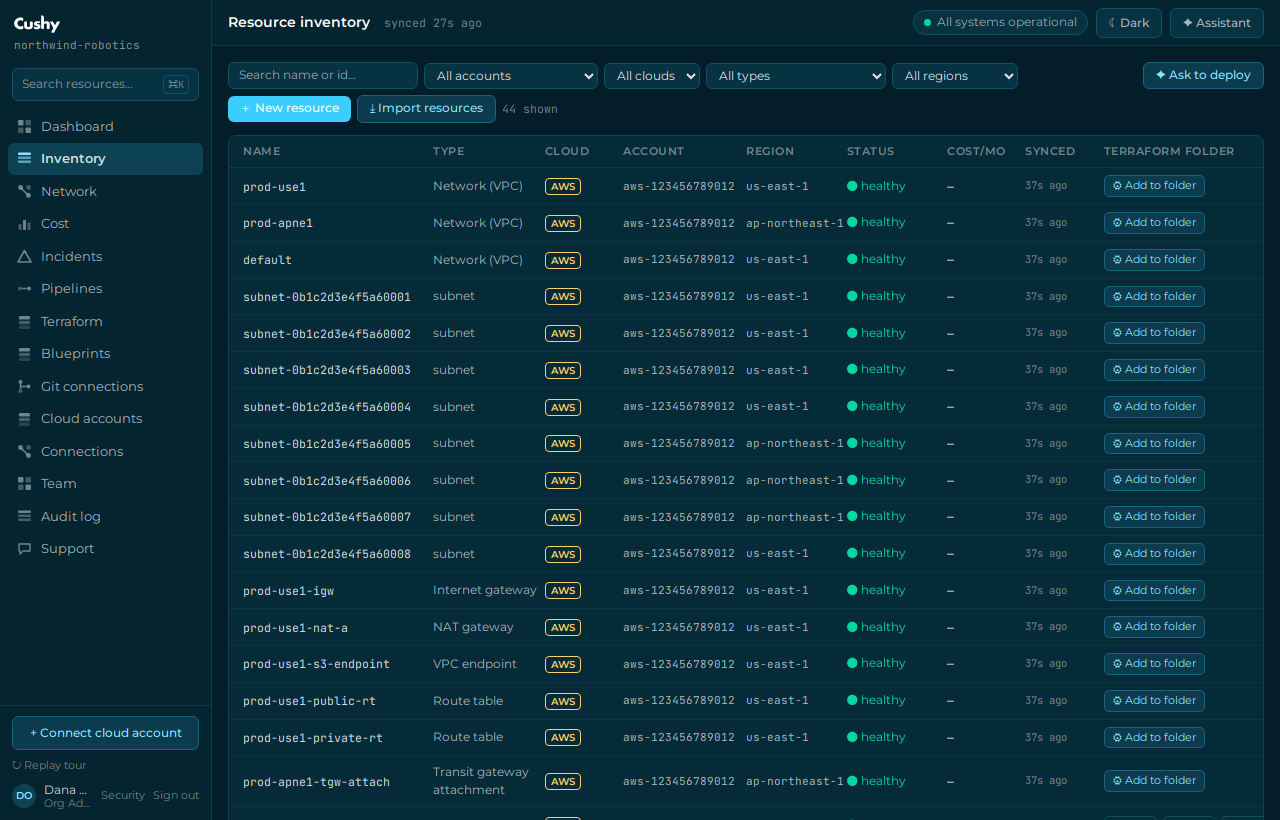
`GET /api/cloud/resources` returns your synced resources with keyset (cursor) pagination. Each row carries its owning cloud accountId, provider, resource type, native id, name, region/zone, status, normalized attributes, provider-specific detail, tags, and first-/last-seen timestamps. Filter by accountId (which connected account owns the resource), provider, type, region and a free-text q that matches name or native id; page with cursor and limit (1–200). This is exactly what the Inventory screen reads.
curl -s "https://cushy.snoweasl.com/api/cloud/resources?accountId=42&type=compute&q=prod&limit=50" \
  -H "Authorization: Bearer cc_pat_YOUR_TOKEN_HERE"
Search, filters and pagination in the Inventory screen
The Inventory screen drives this endpoint directly. A debounced search box feeds q; dropdowns filter by Cloud account, Provider, Type and Region; changing any filter or the search returns you to page one. Each row shows an Account column with the resource's connected-account label (the account name, or provider·reference) so you can tell which of several accounts a resource belongs to at a glance. Prev/Next buttons walk the keyset cursor — Next is disabled on the last page. A search or filter with no matches shows an honest empty state (distinct from the never-connected "Connect a cloud account" prompt).
Resource detail: the full discovered configuration
Opening a resource from Inventory shows a Configuration section that renders everything discovery captured — every normalized attribute as a label/value row (booleans as yes/no), nested structures as sub-tables (a route table's routes[] becomes a destination/target/state table, its associated subnets a chip list), tags as chips, network/subnet associations as labeled references, plus the provider's raw discovery payload (structured) and a collapsible raw-JSON fallback. This works for every resource type, including network plumbing (route tables, gateways, endpoints) and IAM.
Discovery depth per cloud: AWS captures per-type config at sync time — EC2 AMI, key pair, private/public IPs, subnet/VPC, security groups, launch time; RDS engine/version/class/storage, Multi-AZ, endpoint; S3 real bucket region, versioning and default encryption (best-effort per bucket); load balancer scheme/type/DNS name and listeners (best-effort); EKS version/endpoint; Lambda runtime/handler/memory/timeout; VPC CIDR/tenancy; subnet CIDR/AZ/public-IP-on-launch. GCP maps the equivalent fields from the Cloud Asset Inventory payload it already fetches. Azure maps what Resource Graph's properties column already returns (no extra per-resource calls). Alibaba enriches ECS/RDS/SLB from their Describe responses; OSS/ACK/Function Compute listings still await their ROA readers, so those stay honestly empty.
Delta sync and first-/last-seen
Sync is incremental: a pass uses delta cursors to fetch what changed, then normalizes each resource into a common shape while preserving provider-specific detail. A resource's firstSeenAt and lastSeenAt tell you when Cushy first discovered it and when it last confirmed it.
Soft-deleted resources
When a resource disappears upstream it is soft-deleted with the reason removed_upstream; disconnecting an account marks its rows account_disconnected. Both are hidden by default and surfaced with includeDeleted=1, which also returns deletedAt and deletedReason so you can tell an upstream deletion from a disconnect.
Routing every read through the database keeps the console fast and predictable, puts provider rate limits under the engine's token-bucket control, and means a single slow or throttling cloud can never hang your inventory screen.
Scale
The Inventory screen reads the keyset endpoint one page at a time, so it scales past the console envelope's payload budget regardless of how many resources you run (the envelope still carries a shaped summary for other screens). Ten-thousand-resource virtualization and a dedicated queue/worker sync tier are on the roadmap.